
Finding Systems in the Vault
The vault holds every system with results: the systems By DiceData, the community's runs, and your own. You can search it two ways, by asking the chat or on the Vault page. Both use the same filters and the same rules about what's free.
Ask the chat
Ask in your own words, the way you'd ask a friend who knows the vault.
You say
What are the best dark side systems for a $10 table?
You say
Roulette systems for a Comp Grinder.
You say
Show me Iron Cross.
The chat answers with a search card: the game, how many systems it found, your search as tiles, and the top three systems. Tap a system to open it, or tap Show to see the full list beside the chat.
If you're describing your own system, bets and when they go up or come down, the chat builds it instead of searching.
Narrow it down
Reply to what came back. The chat keeps your search, changes the one thing you named, and tells you what moved. It sets the new limit from the systems it found: if they need $400 to $2,000, "cheaper" might mean under $500.
You say
Cheaper to play.
You say
Fewer big losses.
You say
Only ones with a stop loss.
Ask for something different and it starts a fresh search, and says so.
You can also edit the search yourself. Every tile on the card has an X to drop it. Tap a tile to change it, or tap All filters to add one. Undo steps back one change. The card and the list beside the chat are the same search, so a change in one shows in the other.
What "best" means
"Best" depends on who it's for.
- "Best" on its own sorts by highest TrueScore. Sorting by TrueScore requires a paid plan.
- "Best for a Comp Grinder" sorts by best fit for that player. This is free.
- "Highest win rate" sorts by win rate. This requires a paid plan.
The chat always says how it read your ask, and never calls one system the best.
What's free
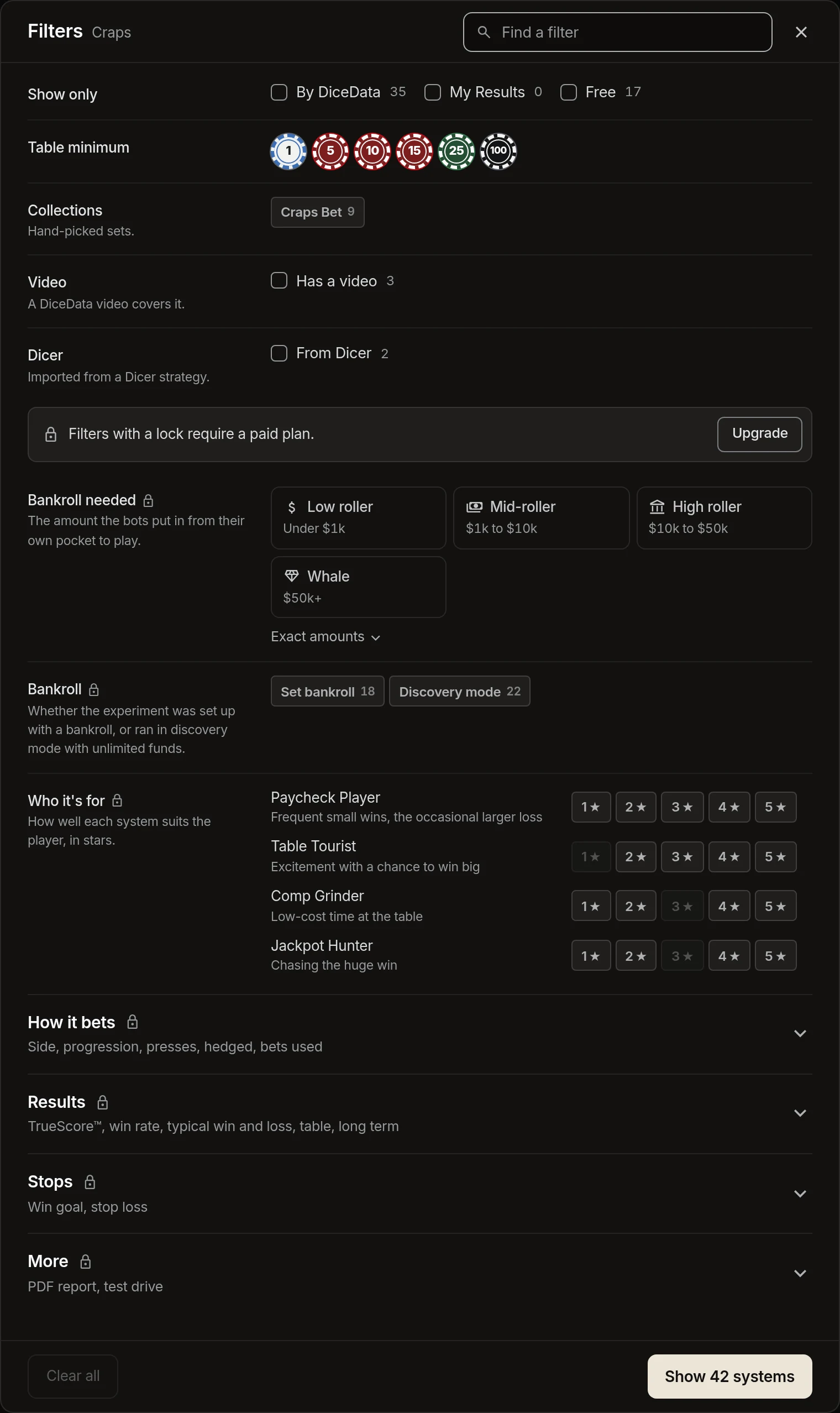
On every plan, signed in or not, you can find systems by what they are and who they suit:
- Name. Search for a system by name.
- Game. Craps, crapless, roulette, or baccarat.
- Who it's for. Paycheck Player, Table Tourist, Comp Grinder, or Jackpot Hunter, rated 4 stars and up.
- Your table. The table minimum, and the wheel for roulette.
- Show only systems By DiceData, your own results, or free systems.
- Collections, systems with a video, and Dicer imports.
- Order by newest, oldest, name, or best fit.
Opening any system is free too, though some systems keep their full results for a paid plan.
What requires a paid plan
A paid plan adds every other filter: how a system bets, what it costs to play, and how it performed.
- How it bets. Side (light, dark, or hybrid), progression, presses, named systems like Martingale, hedged, and the bets it uses.
- Money. The bankroll it needs, from low roller to whale, and whether it was run with a set bankroll or in discovery mode.
- Results. TrueScore, win rate, typical win, typical loss, typical win vs typical loss, table temperature, and long term.
- Stops. Has a win goal, has a stop loss.
- More. Has a PDF report, has a Test Drive.
- The TrueScore measures at the top of the list: house edge, profit retention, jackpot factor and the rest.
- Star level for who it's for, such as 5 stars only.
- Order by TrueScore or win rate.
On the Vault page, filters with a lock require a paid plan. You can still see every one.
When a search needs a paid plan
Without a paid plan, the chat still shows the search you asked for and what it found. If it uses a paid filter, that tile carries a lock, and the card says "This search requires a paid plan."
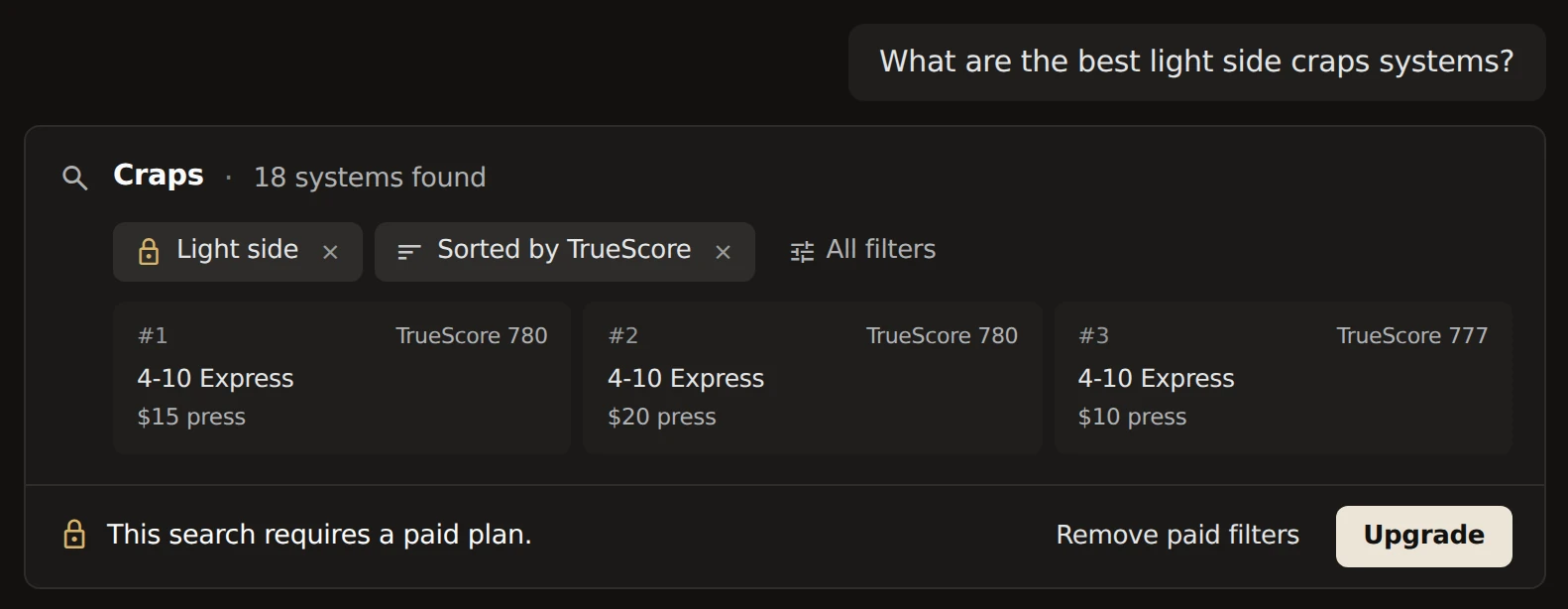
- Remove paid filters strikes through the paid tiles and shows the search without them, right on the card. Tap a struck tile to put it back.
- Upgrade opens the plans.
Removing a paid filter is always free, on the card and in the Filters on the Vault page. Only adding one asks you to upgrade.